


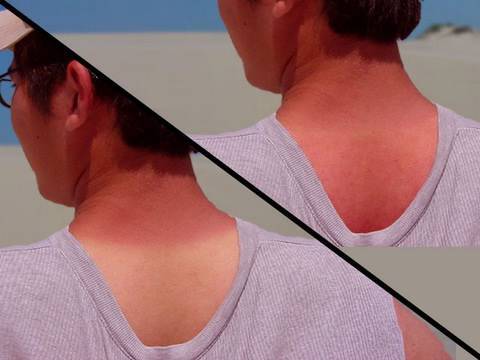
In this tutorial, I will show you how to remove those darn tan lines from your photos in Photoshop CS5. Don’t worry, if you don’t have CS5 I tried keeping it simple without using any of CS5′s new features so that you can do this in any previous version of Photoshop. I hope this helped. Thanks for Watching!
Robert began making video tutorials on YouTube nearly 6 years ago. Teaching Photoshop and Sony Vegas, he's made over 200 video tutorials helping almost 4 million people and has been recognized by Sony. He loves being able to share his knowledge with others and inspiring them to create something awesome.
httpv://www.youtube.com/watch?v=_rjul5wi934 Ever wonder how to remove acne or any other facial blemish in your photos? In this tutorial, I will...read more →
httpv://www.youtube.com/watch?v=TN8q_uNPOxQ Ever wonder how you could levitate yourself easily using Photoshop? In this tutorial, I will show you how to...read more →
httpv://www.youtube.com/watch?v=YoYgBQfCO9g In this photoshop tutorial, I will show you how to make your photos look aged by adding this vintage Polaroid effect....read more →