


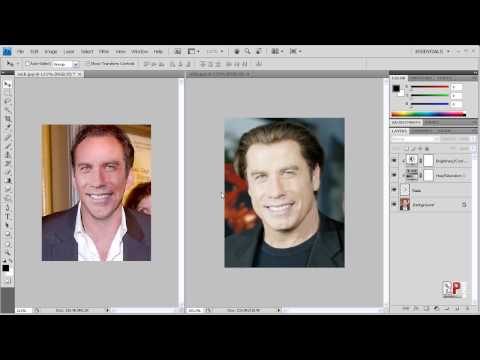
Photoshop CS4: Swap Faces!


Today I’ll be showing you how to swap the faces of people from 2 different images. This is my second attempt at this tutorial and hopefully you’ll learn more from this than my previous tutorial..and it’s in HD.

Site: http://robertsproductions.net
Email: [email protected]

Disclaimer: This is for educational purposes only. After you learn how to do this, you might be tempted to swap faces in your friends’ photos. While you might find it downright hilarious, if they cease to talk to you please don’t hold me responsible. I am not responsible for anything you create with everything you learned from this Photoshop Tutorial.

Hope this helped.
Thanks for Watching!


If you enjoyed this post, please consider leaving a comment or sharing it along with your friends!

Get free email updates!

Subscribe!

Follow us!


Posted Under: Featured Photoshop
Tagged:

Author

Written by Robert Carreno

Robert began making video tutorials on YouTube nearly 6 years ago. Teaching Photoshop and Sony Vegas, he's made over 200 video tutorials helping almost 4 million people and has been recognized by Sony. He loves being able to share his knowledge with others and inspiring them to create something awesome.

  • http://www.youtube.com/profile?user=JoserPwndU JoserPwndU

    wow creepy

  • http://www.youtube.com/profile?user=shadwstealth shadwstealth

    Nice Job much better than before!

  • http://www.youtube.com/profile?user=andydog93 andydog93

    NIIICEE

  • http://www.youtube.com/profile?user=tinaawifk tinaawifk

    wow, this really helped! =)
    im subscribing!

  • http://www.youtube.com/profile?user=rome769 rome769

    wow you must really like the tutorials from videocopilot for your intros!!

  • http://www.youtube.com/profile?user=hfmaia1 hfmaia1

    Ow, sensacional, sempre quis aprender fazer isso, show de bola, vo testa o tuto aqui agora.

  • http://www.youtube.com/profile?user=diana8lim diana8lim

    wow really great tutorial. exactly what im looking for. good pacing and clear explanations.

  • http://www.youtube.com/profile?user=anything4any1 anything4any1

    you got the intro tut from video copilot

  • http://www.youtube.com/profile?user=SuperDbzmaster SuperDbzmaster

    this is the best tut of all i am subbing

  • http://www.youtube.com/profile?user=SkaterMutantNinja SkaterMutantNinja

    Does anyone know how to do this in photoshop elements 4.0?

  • http://www.youtube.com/profile?user=djbeto267 djbeto267

    Just a heads up, I will be creating a tutorial on how to do this in Photoshop Elements 7 very soon.

  • http://www.youtube.com/profile?user=lockerzel95 lockerzel95

    i have a mac and im a newbie. i dont know how to resize the face or anything can u help me out? like i don’t get the box around the face that i can move.

  • http://www.youtube.com/profile?user=djbeto267 djbeto267

    Make sure the face layer is selected, then go to “Edit”, “Free Transform”.

  • http://www.youtube.com/profile?user=djbeto267 djbeto267

    …or type – Cmd – T since your on a mac.

  • http://www.youtube.com/profile?user=admanphoto admanphoto

    I love this video. Thanks.

  • http://www.youtube.com/profile?user=GoldJompa GoldJompa

    lol awesome vid, gj

  • http://www.youtube.com/profile?user=lauvicente7 lauvicente7

    how did you get the 2nd picture there?

  • http://www.youtube.com/profile?user=simpsonsfan952 simpsonsfan952

    when I’m pressing PASTE nothing its happening…. help please ?

  • http://www.youtube.com/profile?user=ozziiey ozziiey

    how to save it as a picture :O

  • http://www.youtube.com/profile?user=TheWarcraft3WE TheWarcraft3WE

    Save as JPG or PNG

  • http://www.youtube.com/profile?user=MrDarkside23 MrDarkside23

    thank you so much… that helps alot..

  • http://www.youtube.com/profile?user=HolyShadow180 HolyShadow180

    That was very very good!!!! Thanks you so much!

  • http://www.youtube.com/profile?user=asianfred606 asianfred606

    Lol I used the same pics! and I thought I was being original lol

  • http://www.youtube.com/profile?user=SirTsixlas SirTsixlas

    that’s a real face off!!
    thank you very much.5/5

  • http://www.youtube.com/profile?user=283051307 283051307

    how could i rename the layer?thanks….

  • http://www.youtube.com/profile?user=cheatonly2win cheatonly2win

    click the layer’s name, wait like 3 seconds and click again..

  • http://www.youtube.com/profile?user=AlonaHernandezfxsds AlonaHernandezfxsds

    reezi(.)com/photoshop has photoshop skills….

  • http://www.youtube.com/profile?user=TonyaHarveyxeror TonyaHarveyxeror

    Attention photoshopn00bs! reezi(.)com/photoshop has a free tutorial today

  • http://www.youtube.com/profile?user=VViP30U7 VViP30U7

    Dude the ending results look uglier than the first one… ugh.

  • http://www.youtube.com/profile?user=joeyyowee joeyyowee

    I don’t understand how you get the color of the new picture to match up with the face. I used the hue and saturation tool but it still doesn’t work

  • http://www.youtube.com/profile?user=Angefresh Angefresh

    love it, will have to contact you soon sir

  • http://www.youtube.com/profile?user=AngelTeen123 AngelTeen123

    i have the same problem! :/

  • http://www.youtube.com/profile?user=ehemehemehem ehemehemehem

    how do you put two pictures at once in photoshop? .. sorry noob here.

  • http://www.youtube.com/profile?user=joeyyowee joeyyowee

    It depends on the faces you use. If the two people have a similar color to begin with and the lighting is similar, you shouldn’t have a problem. If you try and put a black person’s face on a white person’s face, you might have a problem. I also found that it’s easier to swap black ppl’s faces than white ppl’s faces for some reason.

  • http://www.youtube.com/profile?user=kandpsmashlab kandpsmashlab

    how do i rotate the face? and move it around?

  • http://www.youtube.com/profile?user=botchok5 botchok5

    click the show transform tool on top when you click the Move Tool or when you press V

  • http://www.youtube.com/profile?user=RJBCWORKZ RJBCWORKZ

    @kandpsmashlab , for the shortcut key just press Ctrl-T to free transform

  • http://www.youtube.com/profile?user=SuperDrifter101 SuperDrifter101

    what is called this effect Is this in Imovie or Screen recorder

  • http://www.youtube.com/profile?user=Broken995 Broken995

    THANK YOU!!!

  • http://www.youtube.com/profile?user=HBKasdf HBKasdf

    how do you put the 2 photos next to eachother??

  • http://www.youtube.com/profile?user=TheKeithCarnes TheKeithCarnes

    Thanks so much man, so many shitty videos on here. You helped me put my face on John Morrison’s head, lol. Thank again!

  • http://www.youtube.com/profile?user=salwaoo8 salwaoo8

    i have problem with cursor.when i click burn tool,d cursor became hand cursor and i could’t put it back to default cursor.how to solve? pls…..

  • http://www.youtube.com/profile?user=spinert spinert

    mad intro bruz lol

  • http://www.youtube.com/profile?user=spinert spinert

    @joeyyowee wat r u tryin say that black r more easier 2 mess with huh??
    naaah only messin with ya man hahaha

  • http://www.youtube.com/profile?user=robwestlos robwestlos

    Nice video ur good !!!!!! i was wondering if u can help me with a picture , please let me know ?

  • http://www.youtube.com/profile?user=joeyyowee joeyyowee

    @spinert lol I’m far from being racist.

  • http://www.youtube.com/profile?user=khalids19 khalids19

    ok first thing gud tutorial and u helped me soo much.second.which vieo screen capture software did u use? and that intro of yours how did u make it with After Effects?can u give me source files???just requesting.

  • http://www.youtube.com/profile?user=roronoazoro61 roronoazoro61

    lol faceoff

  • http://www.youtube.com/profile?user=shazzbot007 shazzbot007

    Match color tool would have been helpful, nice vid, thanks

  • http://www.youtube.com/profile?user=j070491 j070491

    aww cool…thanks :D

  • http://www.youtube.com/profile?user=puzzrod puzzrod

    gud accent

  • http://www.youtube.com/profile?user=pinkfeet518 pinkfeet518

    this is so cool! i swapped obama with oprah.

  • http://www.youtube.com/profile?user=TheConstipatedcamel TheConstipatedcamel

    don’t start making elements videos!

  • http://www.youtube.com/profile?user=srafic srafic

    crap dude im new to this and i dont have burn tool how to get it??

  • http://www.youtube.com/profile?user=useurcamera useurcamera

    lol thnx it helped a lot

  • http://www.youtube.com/profile?user=TheSpiXeL TheSpiXeL

    #LOL
    Thanks!! :)

  • http://www.youtube.com/profile?user=rickvdsteen rickvdsteen

    I dont get that nice hazy edge around his face when i copie it???

  • http://www.youtube.com/profile?user=cyb3rmann cyb3rmann

    Thanks!

  • http://www.youtube.com/profile?user=coadzjha012 coadzjha012

    thanks bro ! i knew it!

  • http://www.youtube.com/profile?user=MrLightingstar MrLightingstar

    Wao,great tip buddy,Thanks

  • http://www.youtube.com/profile?user=xx0nePiecexx xx0nePiecexx

    this works on photoshop cs5 ??

  • http://www.youtube.com/profile?user=SpinrOfficial SpinrOfficial

    awesome tutorial dude

  • http://www.youtube.com/profile?user=salievenjur salievenjur

    how to have 2pictures? at the same time?

  • http://www.youtube.com/profile?user=skystreet55 skystreet55

    Thanks For Adding it

  • http://www.youtube.com/profile?user=Chusuka Chusuka

    i loooooooove your voice. :D
    it reminds me og leo and satan. <3

  • http://www.youtube.com/profile?user=herewithyou1 herewithyou1

    how do u rename the layer?

  • http://www.youtube.com/profile?user=herewithyou1 herewithyou1

    Thank you verry much! you make my friend get be boys! xD

  • http://www.youtube.com/profile?user=owmyfoot96 owmyfoot96

    @herewithyou1 double click the layer name (e.g. background) twice and it will highlight the current name or come up with a window which allows you to enter a name

  • http://www.youtube.com/profile?user=Quantumman100 Quantumman100

    heheh face of

  • http://www.youtube.com/profile?user=kishiohno kishiohno

    thanks man. I made my friend laugh like hell using this technique!

  • http://www.youtube.com/profile?user=SeeveX SeeveX

    yes make more

  • http://www.youtube.com/profile?user=VJusticeLove4Ever VJusticeLove4Ever

    Nicholas Travolta ?

  • http://www.youtube.com/profile?user=LeeHeeRin LeeHeeRin

    nice one…

  • http://www.youtube.com/profile?user=LeeHeeRin LeeHeeRin

    nice one….

  • http://www.youtube.com/profile?user=Zethux Zethux

    Video Copilot Intro FTW!

  • http://www.youtube.com/profile?user=ThomasDrimm ThomasDrimm

    ahahah intro made with a tutorial of videocopilot !!!! you rock !

  • http://www.youtube.com/profile?user=bhabytrixie09 bhabytrixie09

    how can u blur the side of the face? =/

  • http://www.youtube.com/profile?user=9kdc9 9kdc9

    It helped

  • http://www.youtube.com/profile?user=DudeSimpson DudeSimpson

    Excellent Face/Off reference.

  • http://www.youtube.com/profile?user=edwinjangao edwinjangao

    awesome tutorieal.

  • http://www.youtube.com/profile?user=martinkolev4 martinkolev4

    when i paste the face it either shows too big or too small, what do i do?

  • http://www.youtube.com/profile?user=djbeto267 djbeto267

    @martinkolev4 Go to “Edit” “Free Transform” or hit ctrl-T to change its size.

  • http://www.youtube.com/profile?user=ussprinceton2004 ussprinceton2004

    can you do this using Photoshop Elements 9?

  • http://www.youtube.com/profile?user=GeekyPiano7 GeekyPiano7

    how about photoshop elements 2.0?

  • http://www.youtube.com/profile?user=wearedesign wearedesign

    I have made my own tutorial on how to do this – might find it useful…

    youtube . com / watch?v=yc35odesnks

  • http://www.youtube.com/profile?user=nerdmixer1 nerdmixer1

    are you gay

  • http://www.youtube.com/profile?user=EntertainmentTrends EntertainmentTrends

    Holy crap that should be something in a horror movie!

  • http://www.youtube.com/profile?user=blkoutt8 blkoutt8

    ha! face off lmao i love it!

  • http://www.youtube.com/profile?user=elephantstreets elephantstreets

    so i cut out a head and dropped it over this other guy. i got everything aligned but the skin tone’s don’t match at all. i want the neck of this “other guy” to math the face i cut out. it’s not working so well.

  • http://www.youtube.com/profile?user=maredinho123 maredinho123

    i cant brush :/ pls help

  • http://www.youtube.com/profile?user=GangsterDragon GangsterDragon

    Ironic how they had a movie like this… “Face-off”
    =3

  • http://www.youtube.com/profile?user=PivotDXer PivotDXer

    How do you have soften edges?

  • http://www.youtube.com/profile?user=h12345679hk h12345679hk

    very useful and straight-forward. thanks for sharing!

  • http://www.youtube.com/profile?user=Madsantonxd Madsantonxd

    How do you get 2 pictures up in 2 different windows, in the same photoshop session?

  • http://www.youtube.com/profile?user=h0nfar h0nfar

    if there was ever a human being as ugly as nicolas travolta i would GOUGE MY EYES OUT!

  • http://www.youtube.com/profile?user=Greenxth Greenxth

    thanks dude! really helpful.

  • http://www.youtube.com/profile?user=loganrandolph loganrandolph

    boooooo bad video, very unhelpful, you gotta open the pictures and show how to get them in seperate things first man

  • http://www.youtube.com/profile?user=damikele damikele

    I ENTERED

  • http://www.youtube.com/profile?user=section23promotions section23promotions

    Great video, cheers

  • http://www.youtube.com/profile?user=jansteven12 jansteven12

    thanks men

  • http://www.youtube.com/profile?user=jansteven12 jansteven12

    [..YouTube..] thanks men

  • http://www.youtube.com/profile?user=MrHybrix MrHybrix

    [..YouTube..] i like how u used the 2 main characters of faceoff lol

  • http://www.youtube.com/profile?user=TheSammyLV TheSammyLV

    [..YouTube..] it also works in gimp

  • http://www.youtube.com/profile?user=bo0ody2011 bo0ody2011

    [..YouTube..] what is the version of photoshop you use can u give me the link plz to download it ?!?! :D

  • http://www.youtube.com/profile?user=shahzadkhokharji shahzadkhokharji

    [..YouTube..] i like it very much, thanx a lot dear

  • http://www.youtube.com/profile?user=MartinTheL33t MartinTheL33t

    [..YouTube..] Mate, what about shadows? For example from objects?

  • http://www.youtube.com/profile?user=MartinTheL33t MartinTheL33t

    [..YouTube..] And how do I target the face after copying it into the other pic? When moving it around? (the squares that you hold to turn it around?)

  • http://www.youtube.com/profile?user=mateo123i mateo123i

    [..YouTube..] thanx :)

  • http://www.youtube.com/profile?user=shajareddeur shajareddeur

    [..YouTube..] Thaaaaaaaaaaaaaaaanx a lot brother it’s great !!

  • http://www.youtube.com/profile?user=greenbudsaion greenbudsaion

    [..YouTube..] Submit Your Hilarious Face Swaps @ FaceSplat.cоm

  • http://www.youtube.com/profile?user=MrDarrenish MrDarrenish

    [..YouTube..] Hey when you took out your eraser it showed like alot of brushes how to you show all you brushes in the one list/tap thing?

  • http://www.youtube.com/profile?user=KeebzTV KeebzTV

    [..YouTube..] Face/Off. Did anyone get that?

  • http://www.youtube.com/profile?user=KiZza23300 KiZza23300

    [..YouTube..] Lol youre voice is like Mandark from Dexter’s lab :D

  • http://www.youtube.com/profile?user=rodfong591 rodfong591

    [..YouTube..] DOUBBLE CHIN. look cloosly

  • http://www.youtube.com/profile?user=iJosepheen iJosepheen

    [..YouTube..] I like how you talk through the whole thing. Hehe.

  • http://www.youtube.com/profile?user=cheshirerc cheshirerc

    [..YouTube..] Great vid, help me tonnes.

  • http://www.youtube.com/profile?user=MisterGamplays MisterGamplays

    [..YouTube..] FACE OFF!

  • http://www.youtube.com/profile?user=MisterGamplays MisterGamplays

    [..YouTube..] @KeebzTV haha yeah

  • Robert

    Looks like every commenter was jansteven12? Maybe a glitch.

  • http://www.youtube.com/profile?user=MuFu23 MuFu23

    [..YouTube..] HAHAHAHAHAHAHAHAHHAHAAAAAAAAAAAAAAAAAAAAAAAAAAAAAAAAAA!!!!!!!!!!! derp!

  • http://www.youtube.com/profile?user=aymbart aymbart

    [..YouTube..] Travolta has the same lips and the same smile that Barack Obama.

  • http://www.youtube.com/profile?user=dornXklondykeXbar dornXklondykeXbar

    [..YouTube..] “No surgery”…I fucking LOL’d

  • http://www.youtube.com/profile?user=erikjsvids erikjsvids

    [..YouTube..] @shajareddeur oh, i didnt know hulk hogan watches youtube videos! XD

  • http://www.youtube.com/profile?user=dechav1 dechav1

    [..YouTube..] why is it when you move the face over the other one it looks kinda faded, that is the only thing that is screwing me up

  • http://www.youtube.com/profile?user=JacklostYedmore JacklostYedmore

    [..YouTube..] i remember those 2 switched face in a movie that was so fun, good tutorial

  • http://www.youtube.com/profile?user=mlerbeable mlerbeable

    [..YouTube..] after I use free transform to resize/set opacity, every other option in photoshop is greyed out until I merge all layers. but if I merge all layers, I can’t change the saturation/hue/etc of the mismatched skin tones! PLEASE HELP quik