


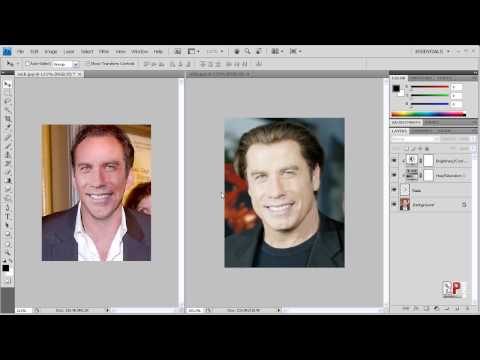
Photoshop CS4: Swap Faces!

Robert September 19, 2009 126 3,202 views

Today I’ll be showing you how to swap the faces of people from 2 different images. This is my second attempt at this tutorial and hopefully you’ll learn more from this than my previous tutorial..and it’s in HD.

Site: http://robertsproductions.net
Email: robert@robertsproductions.net

Disclaimer: This is for educational purposes only. After you learn how to do this, you might be tempted to swap faces in your friends’ photos. While you might find it downright hilarious, if they cease to talk to you please don’t hold me responsible. I am not responsible for anything you create with everything you learned from this Photoshop Tutorial.

Hope this helped.
Thanks for Watching!


  • http://www.youtube.com/profile?user=jansteven12 jansteven12

    [..YouTube..] thanks men

  • http://www.youtube.com/profile?user=MrHybrix MrHybrix

    [..YouTube..] i like how u used the 2 main characters of faceoff lol

  • http://www.youtube.com/profile?user=TheSammyLV TheSammyLV

    [..YouTube..] it also works in gimp

  • http://www.youtube.com/profile?user=bo0ody2011 bo0ody2011

    [..YouTube..] what is the version of photoshop you use can u give me the link plz to download it ?!?! :D

  • http://www.youtube.com/profile?user=shahzadkhokharji shahzadkhokharji

    [..YouTube..] i like it very much, thanx a lot dear

  • http://www.youtube.com/profile?user=MartinTheL33t MartinTheL33t

    [..YouTube..] Mate, what about shadows? For example from objects?

  • http://www.youtube.com/profile?user=MartinTheL33t MartinTheL33t

    [..YouTube..] And how do I target the face after copying it into the other pic? When moving it around? (the squares that you hold to turn it around?)

  • http://www.youtube.com/profile?user=mateo123i mateo123i

    [..YouTube..] thanx :)

  • http://www.youtube.com/profile?user=shajareddeur shajareddeur

    [..YouTube..] Thaaaaaaaaaaaaaaaanx a lot brother it’s great !!

  • http://www.youtube.com/profile?user=greenbudsaion greenbudsaion

    [..YouTube..] Submit Your Hilarious Face Swaps @ FaceSplat.cоm

  • http://www.youtube.com/profile?user=MrDarrenish MrDarrenish

    [..YouTube..] Hey when you took out your eraser it showed like alot of brushes how to you show all you brushes in the one list/tap thing?

  • http://www.youtube.com/profile?user=KeebzTV KeebzTV

    [..YouTube..] Face/Off. Did anyone get that?

  • http://www.youtube.com/profile?user=KiZza23300 KiZza23300

    [..YouTube..] Lol youre voice is like Mandark from Dexter’s lab :D

  • http://www.youtube.com/profile?user=rodfong591 rodfong591

    [..YouTube..] DOUBBLE CHIN. look cloosly

  • http://www.youtube.com/profile?user=iJosepheen iJosepheen

    [..YouTube..] I like how you talk through the whole thing. Hehe.

  • http://www.youtube.com/profile?user=cheshirerc cheshirerc

    [..YouTube..] Great vid, help me tonnes.

  • http://www.youtube.com/profile?user=MisterGamplays MisterGamplays

    [..YouTube..] FACE OFF!

  • http://www.youtube.com/profile?user=MisterGamplays MisterGamplays

    [..YouTube..] @KeebzTV haha yeah

  • Robert

    Looks like every commenter was jansteven12? Maybe a glitch.

  • http://www.youtube.com/profile?user=MuFu23 MuFu23

    [..YouTube..] HAHAHAHAHAHAHAHAHHAHAAAAAAAAAAAAAAAAAAAAAAAAAAAAAAAAAA!!!!!!!!!!! derp!

  • http://www.youtube.com/profile?user=aymbart aymbart

    [..YouTube..] Travolta has the same lips and the same smile that Barack Obama.

  • http://www.youtube.com/profile?user=dornXklondykeXbar dornXklondykeXbar

    [..YouTube..] “No surgery”…I fucking LOL’d

  • http://www.youtube.com/profile?user=erikjsvids erikjsvids

    [..YouTube..] @shajareddeur oh, i didnt know hulk hogan watches youtube videos! XD

  • http://www.youtube.com/profile?user=dechav1 dechav1

    [..YouTube..] why is it when you move the face over the other one it looks kinda faded, that is the only thing that is screwing me up

  • http://www.youtube.com/profile?user=JacklostYedmore JacklostYedmore

    [..YouTube..] i remember those 2 switched face in a movie that was so fun, good tutorial

  • http://www.youtube.com/profile?user=mlerbeable mlerbeable

    [..YouTube..] after I use free transform to resize/set opacity, every other option in photoshop is greyed out until I merge all layers. but if I merge all layers, I can’t change the saturation/hue/etc of the mismatched skin tones! PLEASE HELP quik